
Email and phone number are no longer required when creating a contact person (EBS-16533)
EG Fabri POS
Feature
It is now possible to create a contact person without entering an email address or phone number. Previously, the validation rejected the entry if either of these fields was left blank. The fields remain available but are now optional, making it easier to register contact persons with limited information.
📌Requires Trygg2000 as base ERP system
Return tracking linked to original purchase (EBS-17014)
EG Fabri POS
Feature
When a return is created by looking up a previous purchase, the return now automatically records a reference to the original receipt and item line. This helps prevent the same item from being returned more than once and gives better traceability for claims handling.
Error message now shown for an incorrect PIN when checking gift card balance (EBS-17649)
EG Fabri POS
Feature
Previously, submitting an incorrect PIN in the Check balance flow gave no feedback in the POS - no error message and no visual response. This has now been fixed; an error message is now displayed when the gift card number or PIN could not be validated.
📌Applies for POS'es supporting Retain24 gift cards.
Clearly marking Project as required in the instances where it's applicable (EBS-17773)
EG Fabri POS
Feature
Some customers must have a project on their sale. For these customers, the Project field now has an asterix ('*') next to it, so you can see straight away that it has to be selected. If you try to confirm without choosing a project, a message tells you that a project is needed and the window stays open until you pick one. For all other customers for whom project is not mandatory, nothing has changed.
Delivery address section is hidden when delivery addresses are not in use (EBS-17774)
EG Fabri POS
Feature
The delivery address section in the customer and project selection dialog is no longer shown when your POS configuration indicates that delivery addresses are not used. Previously, the section was always displayed, even where it served no purpose. As this was the only tab in that part of the dialog, the entire tab section is now hidden, giving a cleaner and simpler view at the till. Where delivery addresses are in use, the section continues to be shown and works exactly as before, and no configuration or user action is required.
Improved handling of payment and refund receipts (EBS-18119)
EG Fabri POS
Improvement
When a cashless/gateway payment is refunded, the receipt now correctly shows both the original payment and the refund amount, so the total paid always matches what was actually charged. A payment that has already been refunded — or a refund itself — can no longer be refunded again by mistake.
Cash register list now sorted alphabetically (EBS-18275)
EG Fabri POS
Feature
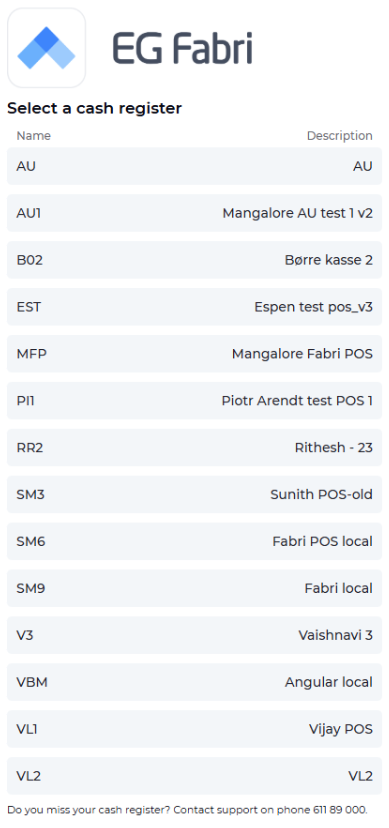
When selecting a cash register, the list of available cash registers is now sorted alphabetically by name, making it easier to find the correct register.
Expeditions list now shows the project (EBS-18109)
EG Fabri POS
Feature
The list of open expeditions (retrieved from the handheld terminal) now includes a Project column, showing which project each expedition is linked to. This matches the equivalent view in the previous POS.
SVEA as payment provider (EBS-14062)
EG Fabri POS
Major feature
What is it?
Fabri POS previously had no standardised way to connect to external payment providers. This release adds a new EG Payment Gateway integration to Fabri POS, with Svea as the first payment provider supported through it. The integration is built to be reusable, so additional payment providers can be added later without rebuilding the connection from scratch.
How it works, step by step
Cashier reaches the payment step of a sale and is shown a "Payment providers" screen — a list of buttons for whichever payment providers are enabled for that till, based on backend configuration.
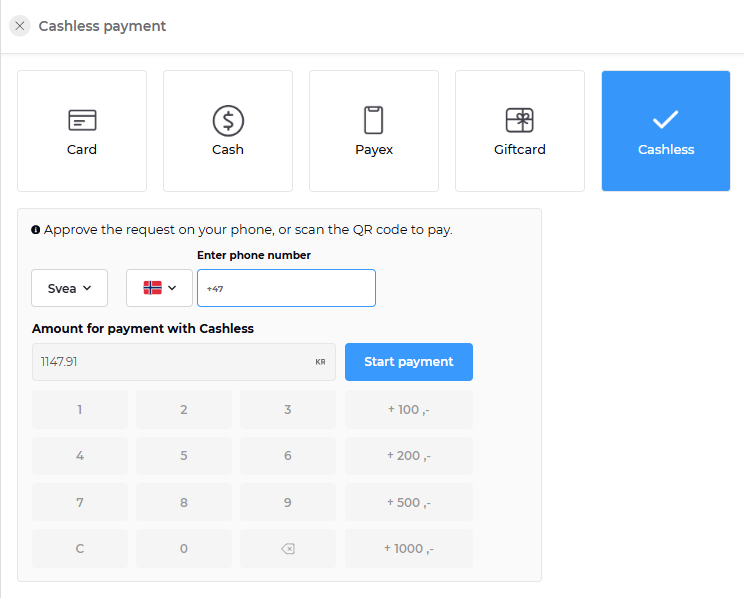
Cashier selects Svea as provider. Fabri POS creates a payment record for the sale and sends the request through to the EG Payment Gateway.
The gateway may ask for more information before it can complete the payment — this could be a text field, an ID number, an email address, a phone number, or an instruction to scan a QR code, depending on what the provider requires. Fabri POS displays whatever the gateway asks for dynamically — the same screen adapts to different providers instead of being built per provider.
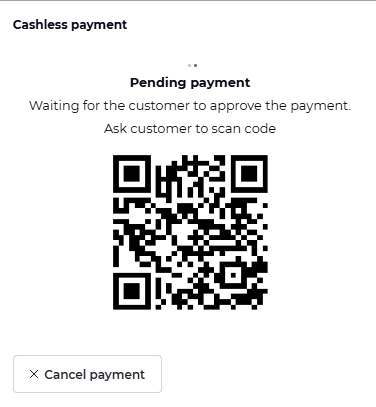
This exchange may repeat several times — the POS and the payment gateway go back and forth — until the transaction is confirmed as either successful or failed.
On success, the sale completes normally: the receipt, journal entry, and transfer of the sale to the ERP all work the same way they already do for other non-cash payments today.
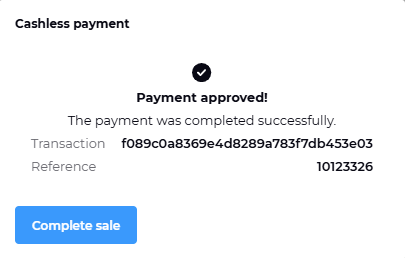
On failure, the cashier sees a single clear error message explaining the payment did not go through, so it can be retried or an alternative payment method used.
What's not included in this release
Payment providers other than Svea — the integration is built to support more providers, but only Svea is enabled through it at this stage.
Refund handling in the till UI — refunds are supported on the backend, but the cashier-facing refund flow is still being finalized.
Other Fabri applications beyond Fabri POS (e.g. Self-Scan) are not yet connected to the EG Payment Gateway — this integration covers Fabri POS only.
📌Requirements
Requires a tenant to be provisioned in the EG Retail payment platform and the desired payment provider(s) enabled in configuration before cashiers will see them as options.
Advanced Claims Handling (EBS-15990)
EG Fabri POS
Major feature
What is it?
Reclamations (claims) — a customer returning a faulty or unwanted item, or one still under warranty — used to be a single "return" in Fabri POS with no way to tell it apart from an ordinary return. This release lets cashiers mark a returned line as a reclamation rather than a regular return, and the till automatically decides whether the claim can be processed there or needs to go through the ERP system instead.
How it works, step by step
Cashier processes a return as usual, adding the returned item as a credit line in the cart
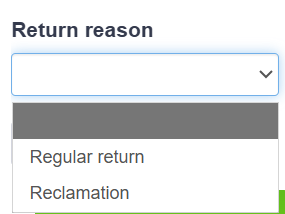
Cashier selects a return reason code on the line — Regular (default) or Reclamation. Regular puts the item's quantity back into stock/inventory in the ERP, exactly as before. Reclamation does not — the item goes into the ERP's claims workflow (inspection, vendor return, etc.) instead of back onto the shelf.
The POS checks the total value of the return lines. If the combined amount of the credit (return) lines — looked at on its own, not combined with anything else in the cart — is over a configurable limit (e.g. 150,- SEK excl. VAT), the cashier is stopped and shown:
"Total return amount is too high. Claim must be processed in ERP"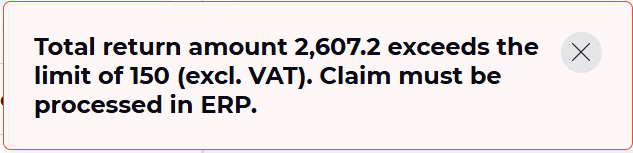
The sale cannot be completed in Fabri POS in that case — it has to be processed in the ERP system instead.The reason code travels with the sale. The receipt (bong) sent to the ERP now carries the reason code per line, so the ERP knows on import whether to restock the item or route it into the claims process
Normal checkout rules still apply on top of this: a cart with only return lines still produces a credit note or cash refund, and a cart with matching debit and credit lines can still complete at a total of 0,-.
What's not included in this release
Ordering a replacement item that isn't in stock, or sending an item back to the vendor for warranty inspection — both handled in the ERP, not in Fabri POS.
Reclamations where the customer's only proof of purchase is an invoice rather than a receipt/bong number — Fabri POS can only look up its own sales by receipt number, so these go through ERP directly.
Reporting and statistics on claims — available separately in the ERP, not in the POS itself.
📌Requirements
Requires Aspect4 as base ERP-system.
Not available for stores using "Skattebox" (Swedish fiscal cash register requirement) — Skattebox does not support combining debit and credit lines in the same sale, which this feature relies on.
Third Party Invoicing (Ombudsfakturering) (EBS-16405)
EG Fabri POS
Major feature
What is it?
Some professional customers buy certain goods — paint, for example — from one specific supplier, and that supplier invoices those goods to the customer directly. The store owns and hands over the stock, so its shelves act as the supplier's store, and the supplier sends a credit note back to the store that is matched against the credit purchase order in the back office.
With this release, EG Fabri POS brings that arrangement into a single sale at the till. The cashier scans everything the customer is buying — ordinary goods and supplier-invoiced goods together — and the POS works out by itself which articles the supplier will invoice later and which articles the customer pays for here and now. No second sale, no manual price adjustments, no judgement calls at the counter.
How it works, step by step
Marking happens in the back office. Customers and articles covered by the arrangement are flagged in Aspect4, and EG Fabri POS picks this up automatically — there is nothing to configure in the POS.
The customer is flagged the moment they are selected. When a covered customer is chosen in Velg kunde/prosjekt, a clear label is shown on the selected customer — so the cashier knows before the very first scan that this sale is covered.
Covered lines are recognised and labelled automatically. When both the customer and the article are covered, the line is tagged "Ombudsfakturering" and its unit price is set to 0,01 — the goods are effectively taken out of what the customer pays at the till, because the supplier will invoice them directly. Quantity stays fully editable, and everything else on the sale is priced exactly as usual.
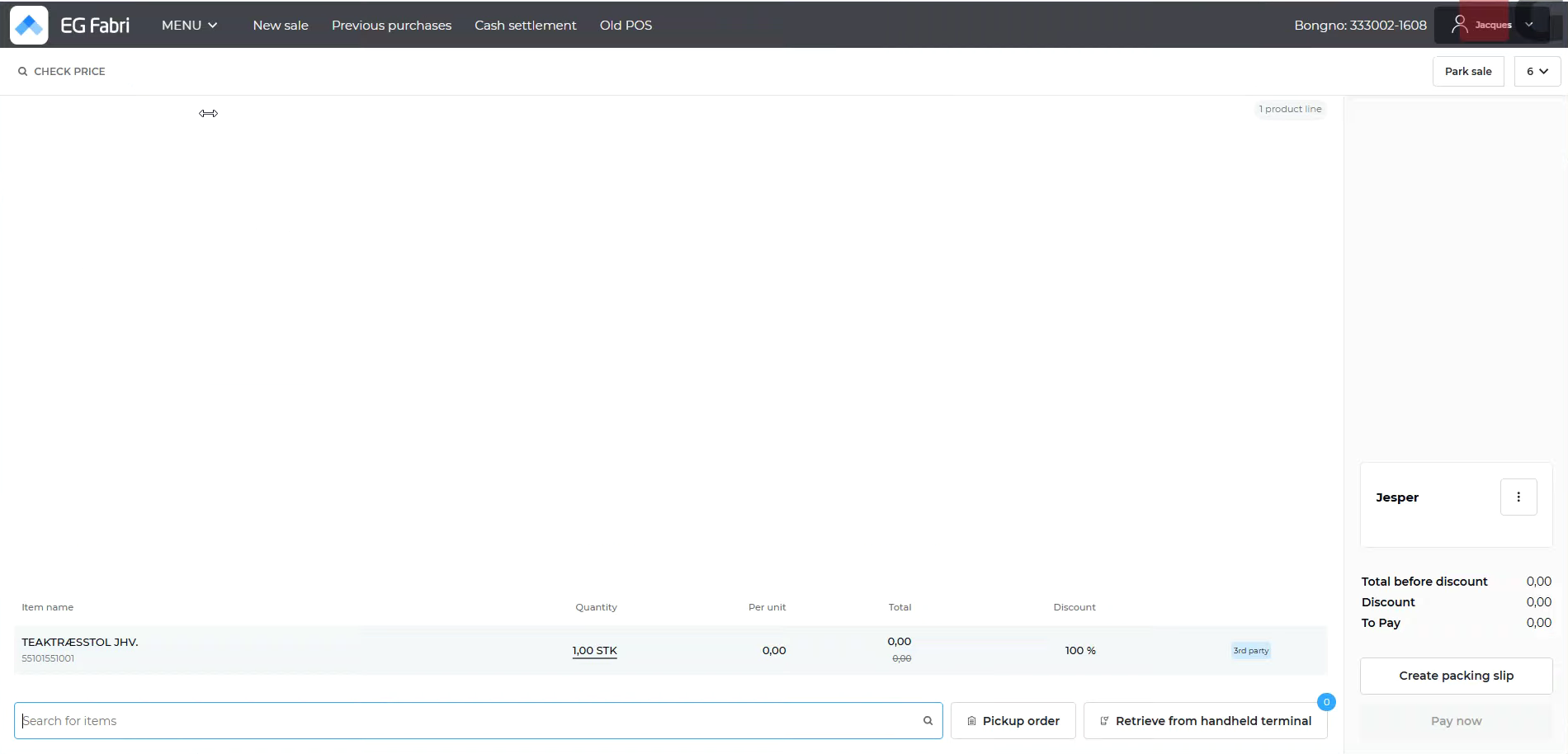
Price and discount are locked on covered lines. They cannot be changed by hand from any entry point — line edit, quick discount buttons, manual price override — and a whole-order discount leaves them untouched. A tooltip explains why the fields are disabled. Normal lines in the same sale behave exactly as today.
The sale must be invoiced, not paid at the till. While the cart holds a covered line, "Pay now" is unavailable — the sale has to be completed through the invoice flow so the supplier's goods end up on an invoice rather than in the cash drawer. Remove the last covered line and "Pay now" becomes available again immediately.
The receipt says so too. Covered articles are marked on the printed receipt — both the standard receipt and the A4 print — so the customer can see at a glance which goods will be invoiced separately by the supplier.
If the marking is unavailable, the sale is never blocked. Should Aspect4 not return the flag for a customer or an article, the POS treats it as not covered and prices it normally, rather than stopping the checkout.
Available in both the new and the classic POS user interface.
What's not included in this release
Split payment on a sale containing third party invoiced lines is out of scope for this release.
📌Requirements
Requires Aspect4 as base ERP-system.
Customers and articles must be marked as covered by third party invoicing in Aspect4 — the POS acts only on what it receives from the ERP.
Support for third party payment providers (EBS-13951)
EG Fabri POS
Major feature
What is it?
Fabri POS previously had no standardised way to connect to external payment providers. This release adds a new EG Payment Gateway integration to Fabri POS, built to support multiple payment providers through one reusable connection rather than a separate integration per provider. Svea is the first provider live through this gateway.
How it works, step by step
Cashier reaches the payment step of a sale and is shown a "Payment providers" screen — a list of buttons for whichever payment providers are enabled for that till, based on backend configuration.
Cashier selects a provider (e.g. Svea). Fabri POS creates a payment record for the sale and sends the request through to the EG Payment Gateway.
The gateway may ask for more information before it can complete the payment — this could be a text field, an ID number, an email address, a phone number, or an instruction to scan a QR code, depending on what the provider requires. Fabri POS displays whatever the gateway asks for dynamically — the same screen adapts to different providers instead of being built per provider.
This exchange may repeat several times until the transaction is confirmed as either successful or failed.
On success, the sale completes normally: receipt, journal entry, and transfer of the sale to the ERP all work the same way they already do for other non-cash payments today.
On failure, the cashier sees a single clear error message explaining the payment did not go through.
What's not included in this release
Klarna, Vipps, and Swish support — the gateway integration is designed to support these, but their backend and frontend implementation tickets have not started yet. Only Svea is live through this integration today.
Other Fabri applications beyond Fabri POS (e.g. Self-Scan) are not yet connected to the EG Payment Gateway.
📌Requirements
Requires a tenant to be provisioned in the EG Retail payment platform and the desired payment provider(s) enabled in configuration before cashiers will see them as options.
Kivra Digital Receipt Integration (EBS-15119)
EG Fabri POS
Major feature
What is it?
Kivra is a Swedish digital mailbox used by over a third of the Swedish population to receive receipts, invoices, and other documents. With this release, EG Fabri POS can send a digital receipt directly to a customer's Kivra inbox at the moment of purchase — no app, no scanning, no customer action required at the till.
The customer is recognized automatically through the information contained on the selected customer account for the sale (e-mail/phone). If they have Kivra linked to either their e-mail or phone number, their receipt appears in their Kivra inbox as soon as the sale completes.
How it works, step by step
Cashier completes the sale as normal — scanning items and taking payment (card, cash, or gift/misc payment) exactly as today.
The POS silently checks Kivra in the background. When the sale is finalized, EG Fabri POS sends the transaction to a new backend service (the EG Fabri Kivra Service), which checks whether the customer's card is linked to a Kivra account (e-mail/phone).
This check must complete within 3 seconds — it happens before the "Fullfør salget" (Complete Sale) modal is shown to the cashier, so there's no perceptible delay in the checkout flow.
The modal reflects the result automatically:
Kivra account found: A green banner appears in the Complete Sale modal:
"Kivra-kvittering aktivert" Kvitteringen er lagret på kundens Kivra-konto
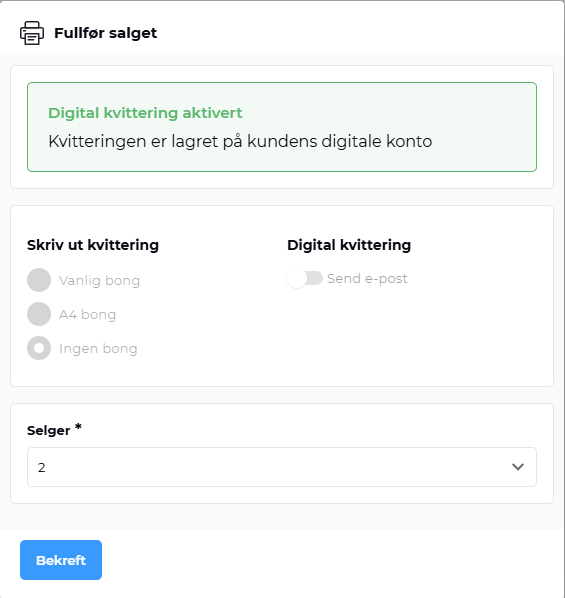
The receipt print option is automatically set to "Ingen bong" (no paper receipt) — the other print options are greyed out and cannot be selected, and the "Send e-post" toggle is disabled. The customer's receipt is already on its way to their Kivra inbox.Kivra account not found: An amber banner appears instead:
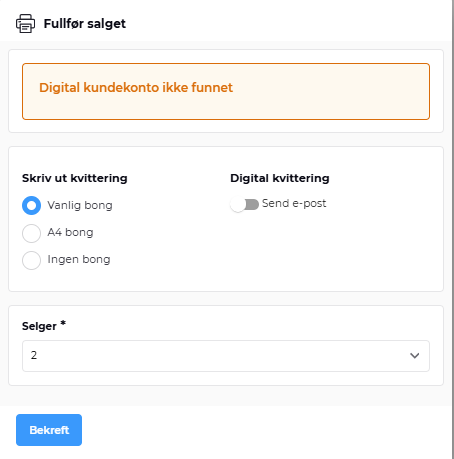
If the Kivra service is slow or unavailable, the POS automatically falls back to the "not found" behavior (standard receipt printed) so the checkout is never blocked or delayed.
What's not included in this release
Printing the QR code on the physical receipt. The backend fully prepares the QR code, but the currently supported receipt printers can't print it yet. Until new printers are procured, customers without Kivra will get a normal paper receipt without a scanable sign-up code.
Registering a new Kivra user, is out of scope — this is handled by Kivra directly, not by EG Fabri POS.
📌Requirements
Requires Aspect4 as base ERP-system.
Customer must have a Kivra account (Swedish digital mailbox) linked to the payment card used at checkout.
All articles are now included when adding a previous purchase to the cart (EBS-14792)
EG Fabri POS
Improvement
When you look up an earlier sale under Previous Purchase and add it to the cart, all articles from that sale are now included. Previously, some articles — such as miscellaneous articles — were left out.
Misleading error message at login has been removed (EBS-15546)
EG Fabri POS
Improvement
Logging in previously showed a server error message, even when nothing was actually wrong. This was caused by a request being sent before the login had finished. The unnecessary request has been removed, so the misleading message no longer appears when logging in.
Duplicate user entry no longer appears after setting a PIN (EBS-16089)
EG Fabri POS
Improvement
Previously, after a user set a new PIN and then logged in with it, the same user could appear twice in the user list. This has been fixed, so each user now appears only once, regardless of how they log in.
Customer display now shows the correct total amount when "Pay Now" is clicked (EBS-16165)
EG Fabri POS
Improvement
Previously, when multiple items were added to a sale, the customer-facing display kept showing the last scanned item instead of updating to reflect the total amount due once "Pay Now" was clicked. This has been fixed — the display now correctly shows the total amount the customer needs to pay.
The product list can be scrolled when a sale contains many products (EBS-16230)
EG Fabri POS
Improvement
In the old user interface, the product list was stuck once about eight products had been added to the cart, so the remaining lines could only be seen by zooming out the browser. The list can now be scrolled normally, no matter how many products are added to the sale.
Long company names are shown correctly on the customer display (EBS-16336)
EG Fabri POS
Improvement
Company names longer than about 20 characters were previously shown in a scrambled way on the customer display, mixing the end of the name into the beginning. The display now shows the first 20 characters of the company name, so the text is readable and looks correct to the customer.
Sale completes correctly after entering salesperson in the dialog (EBS-16357)
EG Fabri POS
Improvement
Entering the salesperson in the "complete sale" dialog now correctly completes the sale. Previously, the system warned that the salesperson was missing, blocking the sale from finishing.
Project now shown and added from previous purchase history (EBS-16411)
EG Fabri POS
Improvement
When retrieving a previous purchase, the associated project is now correctly displayed in the preview and added to the cart along with the customer account. This ensures that all original sale details are accurately carried over when reusing a past transaction.
Log on button is now disabled until the required fields are filled in (EBS-16478)
EG Fabri POS
Improvement
The Log on button could previously be pressed even when the PIN or password field was empty. The button is now disabled until both the user name and either the PIN or the password have been entered. This applies both on the login screen and when changing user.
Logistic number now shown for articles in New Fabri POS (EBS-16555)
EG Fabri POS
Improvement
Logistic number for an article is now displayed correctly in the search results and on the article line after it is added to the sale — matching the behavior of the previous POS UI.
Swedish labels shown correctly on the digital receipt screen (EBS-16666)
EG Fabri POS
Improvement
In New Fabri POS, the digital receipt section on the Finish Sale screen now shows proper Swedish labels (e.g. email recipient, add email) instead of raw text keys when the language is set to Swedish.
Reference number now shown in the expeditions modal (EBS-16979)
EG Fabri POS
Improvement
In New Fabri POS, the "Retrieve from handheld terminal" (expeditions) modal now shows a Reference number column, matching the old POS UI. The existing "Reference" column is renamed to Customer reference.
Only one receipt copy can be printed per sale (EBS-17019)
EG Fabri POS
Improvement
The Last receipt copy window previously allowed the print button to be pressed several times and showed a confirmation each time, even though only the first press produced a receipt. The window now closes automatically once the copy has been printed, and it cannot be used again until a new sale is made. The copy can be printed as either regular or A4 format, regardless of the format used for the original receipt, and switching user does not affect this. This keeps receipt copy handling in line with Norwegian cash register requirements
Retain24 gift cards now work in the new user interface (EBS-17194)
EG Fabri POS
Improvement
Using Retain24 gift cards in the new POS user interface previously ended with a server error message, so gift cards could not be topped up, balance checked or used for payment. This has been fixed and the full Retain24 flow now works. The gift card search also waits until both the card number and the PIN have been entered then gives result.
Gift card fields are now cleared when the provider is changed (EBS-17313)
EG Fabri POS
Improvement
Switching gift card provider previously kept the data from the other provider on screen, such as the gift card number, the search result and an entered amount. All fields and search results are now cleared when the provider is changed, and when the Check balance tab is reopened.
Gift card "Check balance" now opens with a fresh, empty view (EBS-17484)
EG Fabri POS
Improvement
The Check balance tab previously still showed the result of the last gift card search when it was reopened, including after a completed sale. The tab now opens empty and shows only the result of the current search.
Settlement is no longer blocked without reason (EBS-17507)
EG Fabri POS
Improvement
Settlement could previously fail with no message shown, even when no parked sales existed. This has been fixed. If a parked sale does exist on one of the tills, settlement is still blocked, but staff now see a clear message explaining that parked sales must be completed or deleted first. No action is required.
Norwegian, Danish and Swedish special characters now print correctly on receipts (EBS-17572)
EG Fabri POS
Improvement
Letters such as æ, ø and å are now printed correctly on all receipts. Previously they appeared as unreadable characters in some fixed receipt texts, for example "Vår ref:", "Sum å betale:" and "Øreavrunding:". The text encoding has been corrected. No action is required.
No error message shown when a user's session expires (EBS-17724)
EG Fabri POS
Improvement
Previously, a new Fabri POS user whose session had expired would briefly see an error message that disappeared on its own after a few seconds, with no way to view it again. This has been aligned with the existing POS behavior — no error message is now shown in this case.
New users no longer show as "NaU" before their account is fully set up (EBS-17733)
EG Fabri POS
Improvement
When a newly created user logged in before their account had finished syncing to the till, the profile section in the top-right corner showed "NaU" instead of a name. This has been improved— until the sync completes, the user's ID is now shown instead, and the full name appears automatically once the account has synced.
Cash settlement dialog now closes automatically after printing the Z-report (EBS-18052)
EG Fabri POS
Improvement
Previously, after completing a cash settlement and printing the Z-report, the confirmation dialog stayed open and did not close on its own. This has been fixed — the dialog now closes automatically once the Z-report has been printed successfully.
ID-control message no longer shown twice (EBS-18055)
EG Fabri POS
Improvement
When processing a sale for a customer with mandatory ID control, the ID-control confirmation message was displayed twice. This has been fixed — the message now appears only once, as expected.
📌Requirements
Requires Trygg2000 as base ERP-system.